
Parent
-
How Do I Clear Cache or Browser History?
You use a browser every day to check your email, attend class and navigate throughout the school. Your browser holds onto information, and over time it could cause problems with logging in or bringing up websites. It’s always a good idea to clear out the cache, or browser history, and clear cookies on a regular basis. Below you will find links to instructions on how to clear your cache and browser history for Chrome, Firefox, Edge, and Safari. To open the instructions, click the icon of the browser you are using.

Chrome
Firefox
Safari
Edge
If this did not resolve your request, Chat With Us or Submit A Ticket.
-
How To Add Secondary Email To Your Canvas Account
As a part of the secure login process, parent accounts were issued with google credentials. Parents use these credentials to access their student’s classes. While it is acceptable to use this assigned email address for your school communications, we understand that sometimes it is more convenient to use your primary email address. If you would like to do that, please follow the directions below.
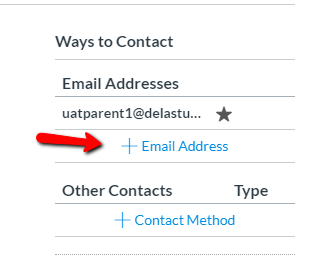
On the settings page, in the top left there is a “Ways to Contact” section. Click on the “+ Email Address” and enter the email you would like to use. You will be prompted that the email needs to be confirmed. Go to your email, search for the email from Instructure Canvas, and click the link to confirm it. This will direct you back to your settings area.
If you would like the additional email to be your primary email in the system, click on the star next to it to highlight and select that email as primary.
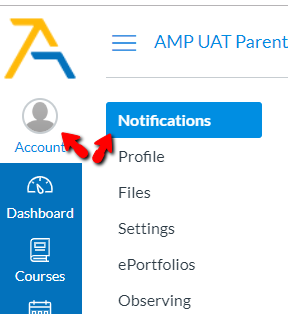
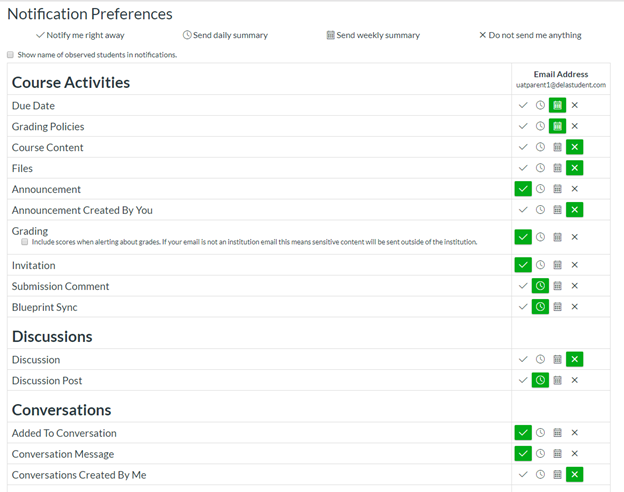
Once you have added your additional email address as a contact method, you will need to update how you would like to be notified. This is done through the notifications area where you can set the method and frequency for all your contact methods.
To make sure you get the emails at your newly added address, adjust this in the Conversations section. (Conversations are what Canvas calls the email).
If this did not resolve your request, Chat With Us or Submit A Ticket.