

Student
-
Where Can I Find My School Login Information
-
Introduction To Your Online School
-
Successful Student Tips
-
6-12 Student Walkthrough
-
K-5 Student Walkthrough
-
How To Login On Your First Day Of School
IMPORTANT: CHECK PARENT/LEGAL GUARDIAN PERSONAL EMAIL INBOX FOR CREDENTIALS (STUDENT LOGIN INFORMATION). Double check your spam folder.
1. To access your Course Dashboard,
- Go to your school website and click on Student Login, top right-hand corner.
2. Click on the course named “Orientation” on your first day of school, not prior to first day of school. if you are logging in before, you will not see this course card.
3. After you enter the Orientation course, (a) Click on Conferences on the left navigation menu (b) Click Join
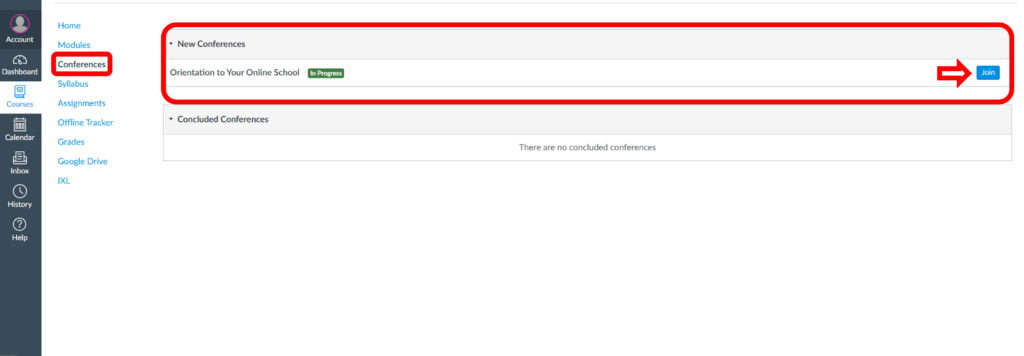
Your Orientation Live Conference Session will be held on your first day of school. Please plan to have parent and student attend this session.
OR
You may choose to do this by watching a Recorded Advisor Orientation Session. This recording will help you understand how to access and navigate your coursework, how to connect with your teachers, and how to access daily live conference sessions.
Once you complete your orientation, you will have the knowledge and confidence to begin your online school journey. After your orientation is complete, you will see the following in your Course Dashboard
- Courses and/or Electives- varies by grade band
- Homeroom course
- Orientation course will be available to you for future reference
If this did not resolve your request, Chat With Us or Submit A Ticket.